Same Vendor Migration
From Tranzman Documentation
Same Vendor Migration involves 2 parts- TZM Server side and Agent side. Please refer Configure Personality page for more information on selecting the Migration type.
TZM Server side
===Adding the Environment===

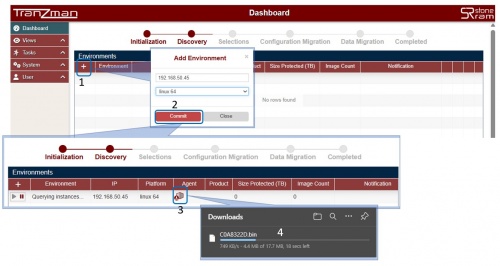
From the Dashboard, click the + button to add the backup environment. Enter the Agent IP and choose the platform of the backup server and click on Commit button.

===Downloading the Agent package===

Tranzman will start Querying instances... using IP address of the added environment and generate an Agent package based on the provided IP address and the OS type.

 |
Windows Agent package is a .exe and *nix Agent will be .bin file. |
|
Package name is a HEXA value of each octet of the corresponding server's IP address. |
|
Package is self signed and is specific to the server it was downloaded for. |
==Agent Side==
=== Installing on Windows ===
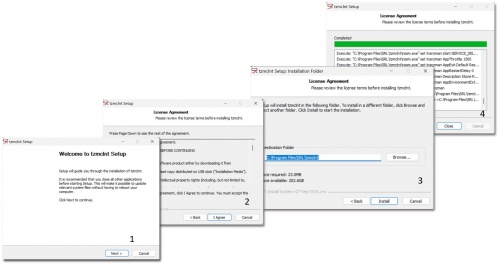
Copy the Agent package to the backup server. The file can be copied and executed from any directory.
Make sure to execute it admin privilage by using "Run as Administrator"
Follow the prompt and complete the Installation. The Agent can be installed on any local path and the default installation path is C:\Program Files\SRL

=== Installing on *NIX/Linux ===
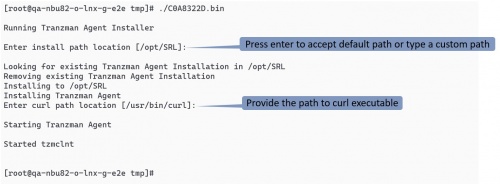
Like the Windows Agent installtion, the *nix/Linux is simple and straight forward. Copy the file to any directory and run it as root user. The default installation path on Linux is /opt/SRL

|
Incase of NetBackup Flex or NetBackup FlexScale appliance, the default installation path is the persistent storage path i.e. /mnt/nbdata/usr/openv/SRL |
| Return to Previous | Go to Next |