Finalize
From Tranzman Documentation
Contents
Finalize Migration in Tranzman Appliance
Finalize completes the migration by transferring the final data and backlogs.
This stage deactivates objects on the origin and activates them on the destination.
Objects include Media Servers, Storage Servers, Robotic Devices, Storage Units, Policies, Clients, etc.
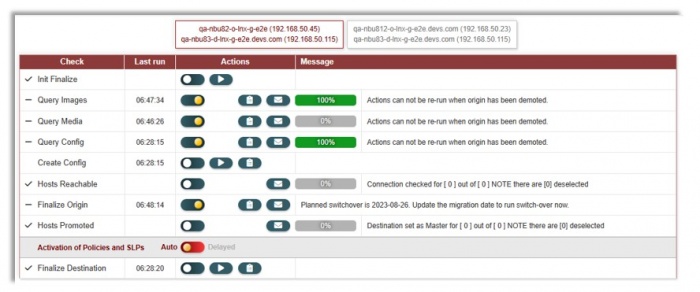

Preparing to Finalize
- Ensure a recent QueryImages job completed (last run < 60 mins) and rerun it manually a few hours before switch-over.
- Progress bars for all configurations must be 100% to perform Finalize Destination.
- Refer to Host Management if Host Reachable or Hosts Promoted are not 100%.
- Image Queue should show 100% (may drop after Init Finalize as pending SLP images are released).
- If Query Config queue is not 100%, run QueryConfig to discover new policies and perform Create Workloads or Create Config actions.
🛈 Tranzman provides visual representation of completed configuration and queue status.
Finalizing Origin
- Click Finalize Origin Run to deactivate Origin policies and SLPs.
- Wait for active jobs to complete or cancel them via NetBackup GUI.
- Tranzman deactivates migrated media servers after jobs finish.
- New QueryImages starts to pick up new images since last scan; wait for completion.
Managing Backlogs & Queues
- Suspend secondary SLP operations on Origin for all SLPs selected for migration before switch-over.
- Initiate Finalize and wait for backlog transfer (Image Queue should show 100%).
-
🛈 QueryImages jobs set to manual after Init Finalize; re-enable in System->Actions until switch-over day.
-

Backlog may be larger on Destination; ensure it can complete! - Make sure ImageQueue is at 100% (may drop due to SLP images or new content).
- Initiate CreateWorkloads to create/update policies not already migrated. Config Queue should report 100%.
- If below 100%, verify policies/config objects and complete manually if required.
- Rerun CreateMedia if Media Queue is not 100%. Ignore if no tape media used in Origin.
-
Media Queue shows 0% until Init Finalize is initiated.

Host Promotion
- Hosts Promoted shows percentage of hosts with Destination master as first SERVER entry.
- Use HostManagement to update all Client and Media Servers to have Destination as master.
- Skip update only if queue contains CLIENTS (not media servers). Media servers MUST be updated (updates EMMSERVER entry).
Finalizing Destination
- By default, finalizing activates all SLPs and Policies. This can be deferred by switching Activation of Policies and SLPs from Auto to Delayed.
- Click Run to finalize destination; this re-enables migrated Media Server, demotes Origin (if selected), and re-activates SLPs/Policies (unless delayed).
- If delayed activation is enabled, an additional row allows manual activation when required.

