Virtual Agent
From Tranzman Documentation
Contents
Creating a Tranzman Virtual Agent from Recordings
Tranzman recordings can be used as a Virtual Agent to perform a dry run of a Transition (up to selections).
The Virtual Agent replicates the process of a real Transition scenario, helping to understand selection and mapping of configurations.
Selections can be exported or imported onto a production Transition.
Virtual Agents can be created from recordings on Disk, Tape, or via Tranzman Shares over SMB. All methods are detailed below.
Create Virtual Agent from Recordings on Disk
- Generate recordings using tzm_recorder. See Using Recorder for details.
- Use the -export_db flag to generate recordings for Virtual Agents.
> tzm_recorder.exe -export_db - This creates a zip file (e.g., TZM_recording_1606735043.zip). Copy it to the system with Tranzman GUI access.
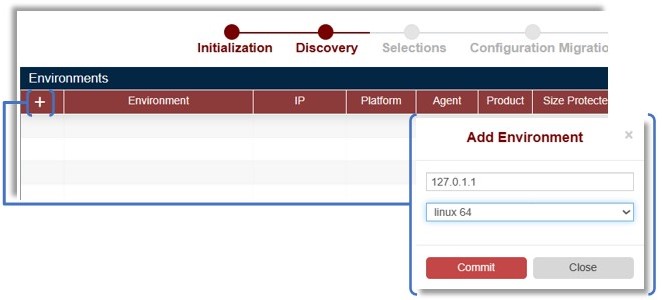
- From Tranzman dashboard, click +. Enter a loopback IP (for virtual agent), select platform, and click commit.
- Click Upload Recordings to upload the zip file.
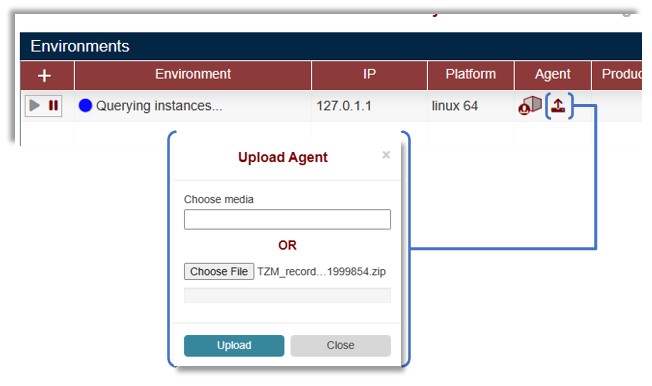
- Creation may take a few minutes. A successful upload triggers the Init job and four Query jobs (QueryProduct, QueryConfig, QueryImages, QueryMedia).

- Once complete, environment details will be visible.

- The environment is now ready for Selections and Pre-Assessment.
🛈 Below steps are based on TZM Recorder run on a NetBackup Backup Server.


Create Virtual Agent from Recordings on Tape
- Uncompress recordings before backing up to tape.
Use -no_zip argument to create unzipped recordings.
> tzm_recorder.exe -export_db -no_zip See Using Recorder for details.
- Backup the recording folder to a dedicated tape. Share the Tape Library with Tranzman Server ( Devices Page ).
- On Tranzman dashboard, click +, enter loopback IP, select platform.
- Click commit and Upload Recordings.
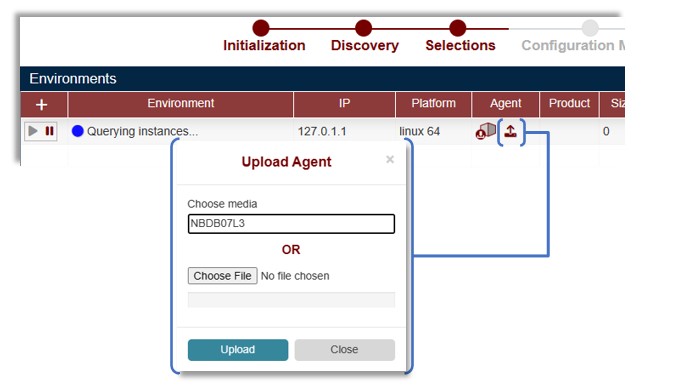
- In Choose media, enter the mediaID of the tape and click Upload. Creation starts and triggers Init and Query actions.

- Once complete, dashboard fields are populated with environment details.

🛈 Below steps are based on TZM Recorder run on a Data Protector Backup Server.


- Open a share from Tranzman Appliance ( Tranzman Shares).
- Run the recorder tool on the backup server and create the recording (uncompressed). See Using Recorder .
- On Tranzman dashboard, click +, enter loopback IP, select platform.
- Share open creates a directory in /data path.
> ls /data/7F000101/
data images jobs process run tools - Copy recordings to the directory using the mounted share.
> ls 7F000101/
data images jobs process TZM_recording_1606735043 run tools - Rename the folder to recording.
> mv TZM_recording_1606735043/ recording/
ls 7F000101/
data images jobs process recording run tools - Dashboard fields are updated for the respective recordings uploaded.
This is another method to create Tranzman Virtual Agent.

