Difference between revisions of "Configure Personality"
From Tranzman Documentation
| Line 11: | Line 11: | ||
The Initial page shows the option to set the "Personality" and enter the "Customer" name. "Customer" is the name of the customer organisation involved in Transition. | The Initial page shows the option to set the "Personality" and enter the "Customer" name. "Customer" is the name of the customer organisation involved in Transition. | ||
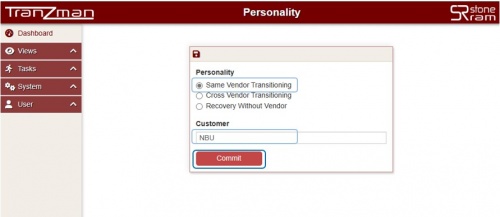
| − | Select <b>Same Vendor Transitioning</b> for same vendor migrations. Same vendor transitioning means to migrate data between same backup products e.g. NetBackup to NetBackup. | + | Select <b>Same Vendor Transitioning</b> for same vendor migrations. Same vendor transitioning means to migrate data between same backup products e.g. NetBackup to NetBackup Migrations. |
[[File:Personality_svm.JPG | border|500px]] | [[File:Personality_svm.JPG | border|500px]] | ||
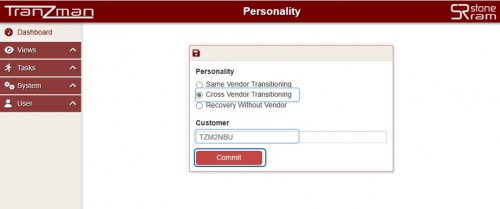
| − | Select <b>Cross Vendor Transitioning</b> for different vendor migrations. Cross vendor transitioning means to migrate data between different backup products e.g TSM(Tivoli Storage Manager) to NetBackup. | + | Select <b>Cross Vendor Transitioning</b> for different vendor migrations. Cross vendor transitioning means to migrate data between different backup products e.g TSM(Tivoli Storage Manager) to NetBackup Migrations. |
[[File:Personality_cvm.JPG | border|500px]] | [[File:Personality_cvm.JPG | border|500px]] | ||
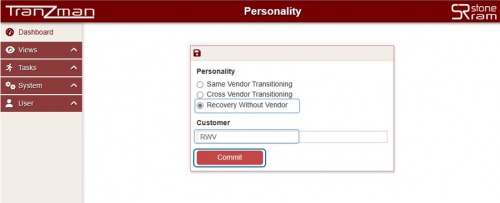
| − | Select <b>Data Recovery to Files</b> for recovery | + | Select <b>Data Recovery to Files</b> for recovery backup data without Backup software. In this case Tranzman can be used for performing indexing and recovery of a backup data without the original backup software or catalog. |
| − | This is useful for legacy data preserved only for restore purpose, where the Tranzman <b> | + | This is useful for legacy data preserved only for restore purpose, where the Tranzman <b>Recovery Without Vendor</b> can be used to retrieve all the data in storage attached to Tranzman appliance. The backup master can be decommissioned, and the backup tapes can be reused on another environment. |
[[File:Personality_rwv.JPG | border|500px]] | [[File:Personality_rwv.JPG | border|500px]] | ||
| − | + | Click on the Commit button to complete the Personality selection. | |
| − | The Commit | + | The Commit set the Personality and redirect to next configuration item (i.e [[ Configure_Storage|Volumes]]) page. |
Revision as of 05:36, 16 May 2023
Tranzman supports different migration type. Same Vendor Transitioning Cross Vendor Transitioning Data Recovery to Files (Recovery without Vendor)
Defining the personality (migration type) is the foremost step in Appliance configuration. To set up the type of Migration or "Personality",use the Tranzman webUI.
Open a Web Browser and navigate to the Appliance's IP address (or hostname if hostname is resolved locally) on the address bar.
The Initial page shows the option to set the "Personality" and enter the "Customer" name. "Customer" is the name of the customer organisation involved in Transition.
Select Same Vendor Transitioning for same vendor migrations. Same vendor transitioning means to migrate data between same backup products e.g. NetBackup to NetBackup Migrations.

Select Cross Vendor Transitioning for different vendor migrations. Cross vendor transitioning means to migrate data between different backup products e.g TSM(Tivoli Storage Manager) to NetBackup Migrations.

Select Data Recovery to Files for recovery backup data without Backup software. In this case Tranzman can be used for performing indexing and recovery of a backup data without the original backup software or catalog.
This is useful for legacy data preserved only for restore purpose, where the Tranzman Recovery Without Vendor can be used to retrieve all the data in storage attached to Tranzman appliance. The backup master can be decommissioned, and the backup tapes can be reused on another environment.

Click on the Commit button to complete the Personality selection.
The Commit set the Personality and redirect to next configuration item (i.e Volumes) page.
| Return to Previous | Go to Next |