Difference between revisions of "Configure Network"
From Tranzman Documentation
| Line 5: | Line 5: | ||
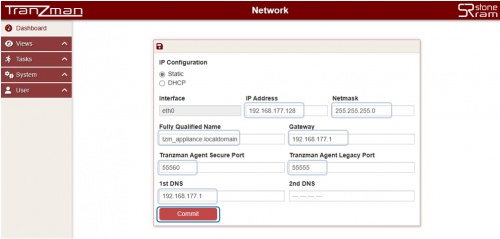
Select <b>Static</b> radio button for static Network configuration. | Select <b>Static</b> radio button for static Network configuration. | ||
In the above case, <b>IP Address</b>,<b>Netmask</b>,<b>Fully Qualified Name</b>,<b>Gateway</b>,<b>Tranzman Agent Secure Port</b>,<b>Tranzman Agent Legacy Port</b>,<b>1st DNS</b>,<b>2nd DNS</b> can be configured to custom values. | In the above case, <b>IP Address</b>,<b>Netmask</b>,<b>Fully Qualified Name</b>,<b>Gateway</b>,<b>Tranzman Agent Secure Port</b>,<b>Tranzman Agent Legacy Port</b>,<b>1st DNS</b>,<b>2nd DNS</b> can be configured to custom values. | ||
| + | |||
[[File:Network_static.JPG | border|500px]] | [[File:Network_static.JPG | border|500px]] | ||
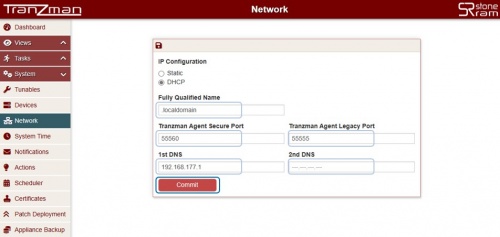
In case of DHCP, <b>Fully Qualified Name</b>,<b>Tranzman Agent Secure Port</b>,<b>Tranzman Agent Legacy Port</b>,<b>1st DNS</b>,<b>2nd DNS</b> can be configured as highlighted below. | In case of DHCP, <b>Fully Qualified Name</b>,<b>Tranzman Agent Secure Port</b>,<b>Tranzman Agent Legacy Port</b>,<b>1st DNS</b>,<b>2nd DNS</b> can be configured as highlighted below. | ||
| + | |||
[[File:Network_dhcp.JPG | border|500px]] | [[File:Network_dhcp.JPG | border|500px]] | ||
Click on <b>Commit</b> to update the configuration. | Click on <b>Commit</b> to update the configuration. | ||
| − | The Commit on successful configuration will redirect to the | + | The Commit on successful configuration will redirect to the [[ Configure_System_Time|System Time]] page for Appliance Date/Time Configuration. |
Note: It is not recommended to modify the Tranzman Agent Ports without StoneRam assistance. | Note: It is not recommended to modify the Tranzman Agent Ports without StoneRam assistance. | ||
Revision as of 05:38, 16 May 2023
By default, Tranzman appliance tries to use the DHCP configuration to configure Network. However, the above can be modified and cutom configured to static configuration using Network configuration page.
Select Static radio button for static Network configuration.
In the above case, IP Address,Netmask,Fully Qualified Name,Gateway,Tranzman Agent Secure Port,Tranzman Agent Legacy Port,1st DNS,2nd DNS can be configured to custom values.

In case of DHCP, Fully Qualified Name,Tranzman Agent Secure Port,Tranzman Agent Legacy Port,1st DNS,2nd DNS can be configured as highlighted below.

Click on Commit to update the configuration.
The Commit on successful configuration will redirect to the System Time page for Appliance Date/Time Configuration.
Note: It is not recommended to modify the Tranzman Agent Ports without StoneRam assistance.
| Return to Previous | Go to Next |