Difference between revisions of "Configure Storage"
From Tranzman Documentation
| Line 1: | Line 1: | ||
This page explains the process of configuring disks and volume configuration after a Tranzman Appliance installation. | This page explains the process of configuring disks and volume configuration after a Tranzman Appliance installation. | ||
| − | |||
The initial configuration for OS disk utilises the smaller disk partition and the larger partition (default 500GB) is used for data staging during Transition to store/retrieve transient data( temporary staging of converted images). | The initial configuration for OS disk utilises the smaller disk partition and the larger partition (default 500GB) is used for data staging during Transition to store/retrieve transient data( temporary staging of converted images). | ||
__NOTOC__ | __NOTOC__ | ||
| − | The <b>Volumes</b> page should list the disk added for the staging. e.g. sdb in this case. | + | The <b>Volumes</b> page should list the disk added for the staging. e.g. sdb in this case. |
| − | Select the disk and click on <b> Configure </b>. | + | Select the disk and click on <b> Configure </b>. |
| − | + | [[File:Volumes1.JPG | border|500px]] | |
| − | |||
| − | |||
| − | + | A new window offers the option to configure the sizing of different partition on the disk. | |
| − | [[File:Volumes2.JPG | border|500px]] | + | In most cases, the default value is the preferred settings. Once modified, click on <b> Commit </b>. |
| + | [[File:Volumes2.JPG | border|500px]] | ||
| − | The | + | The Tranzman appliance will start configuring the disk with the selected partition sizes and redirect to the <b>Network</b> page for Network configuration. |
Revision as of 10:51, 15 May 2023
This page explains the process of configuring disks and volume configuration after a Tranzman Appliance installation.
The initial configuration for OS disk utilises the smaller disk partition and the larger partition (default 500GB) is used for data staging during Transition to store/retrieve transient data( temporary staging of converted images).
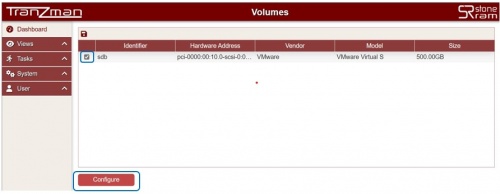
The Volumes page should list the disk added for the staging. e.g. sdb in this case.
Select the disk and click on  Configure .

A new window offers the option to configure the sizing of different partition on the disk.
In most cases, the default value is the preferred settings. Once modified, click on  Commit .
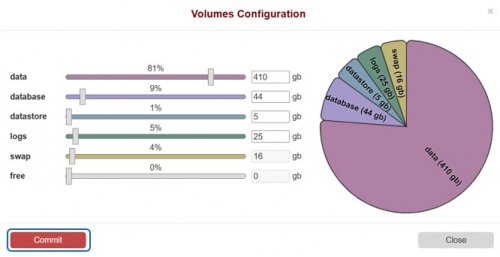

The Tranzman appliance will start configuring the disk with the selected partition sizes and redirect to the Network page for Network configuration.
| Return to Previous | Go to Next |