Difference between revisions of "Transition Readiness"
From Tranzman Documentation
| (4 intermediate revisions by the same user not shown) | |||
| Line 1: | Line 1: | ||
| + | __TOC__ | ||
| + | <br> | ||
| + | <br> | ||
| + | <div style="background-color:#edf7ff; padding: 1.5rem; border-radius:8px; max-width:80%; margin: 0 auto; margin-bottom:2rem;"> | ||
| + | <h1 style="border-bottom:none; font-size:2.5em; font-weight:bold; text-align:center;">Transition Readiness & Starting Migration</h1> | ||
| + | <p style="font-size:1.2em; text-align:left;"> | ||
| + | The <b>Tranzman</b> transition readiness is managed from the <b>Start Transition</b> page.<br> | ||
| + | A checklist of required items must be completed before migration can begin.<br> | ||
| + | Any incomplete item will be highlighted with <span style="vertical-align:middle;">[[File:Hostmanagement_cross.jpg| 15x15px]]</span>. | ||
| + | </p> | ||
| + | </div> | ||
| − | === | + | <div style="max-width:80%; margin: 0 auto;"> |
| + | <div style="background-color:#fffbf4; padding:1.5rem; border-radius:8px; box-shadow:0 2px 4px rgba(0,0,0,0.06); margin-bottom:2rem;"> | ||
| + | <h2 style="border-bottom:2px solid #ffe0b2; padding-bottom:0.5rem; font-size:1.5em;">Transition Checklist</h2> | ||
| + | <p style="font-size:1.1em;"> | ||
| + | Review and complete all items in the checklist before starting migration.<br> | ||
| + | Incomplete items are highlighted for attention. | ||
| + | </p> | ||
| + | <div style="display:inline-block; box-shadow:5px 5px 10px grey; margin:1em 0;"> | ||
| + | [[File:Start_transition_checklist.jpg | 500px]] | ||
| + | </div> | ||
| + | </div> | ||
| − | + | <div style="background-color:#fef3f7; padding:1.5rem; border-radius:8px; box-shadow:0 2px 4px rgba(0,0,0,0.06); margin-bottom:2rem;"> | |
| + | <h2 style="border-bottom:2px solid #f8bbd0; padding-bottom:0.5rem; font-size:1.5em;">Starting the Transition</h2> | ||
| + | <p style="font-size:1.1em;"> | ||
| + | Once all checklist items are complete, click the <b>Start Transition</b> button.<br> | ||
| + | <span style="vertical-align:middle;">[[File:StartTransitionButton.JPG | 150x150px]]</span> | ||
| + | <br> | ||
| + | The state will change to <b>Transition in progress</b> <span style="vertical-align:middle;">[[File:Start_transition_inprogress.jpg | 150x150px]]</span>.<br> | ||
| + | Tranzman will initialise configuration migration and begin data transfer after successful config migration. | ||
| + | </p> | ||
| + | <div style="display:inline-block; box-shadow:5px 5px 10px grey; margin:1em 0;"> | ||
| + | [[File:Config_migration_animation.gif | 700px]] | ||
| + | </div> | ||
| + | </div> | ||
| + | </div> | ||
| − | + | <div style="display:flex; justify-content:space-between; margin-top:2rem; padding:1rem; background-color:#ffffff; max-width:90%; margin: 2rem auto 0;"> | |
| − | + | <div style="text-align:left;"> | |
| − | + | [[Image:prev_icon.jpg|30px|link=Licensing]] [[Licensing|Previous]] | |
| − | + | </div> | |
| − | + | <div style="text-align:right;"> | |
| − | --- | + | [[Image:next_icon.jpg|30px|link=Monitoring]] [[Monitoring|Next]] |
| − | + | </div> | |
| − | |||
| − | |||
| − | |||
| − | |||
Latest revision as of 06:18, 12 September 2025
Contents
Transition Readiness & Starting Migration
The Tranzman transition readiness is managed from the Start Transition page.
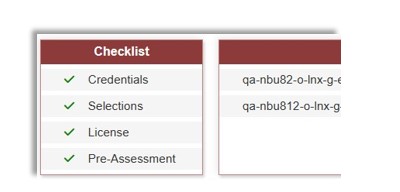
A checklist of required items must be completed before migration can begin.
Any incomplete item will be highlighted with  .
.
Transition Checklist
Review and complete all items in the checklist before starting migration.
Incomplete items are highlighted for attention.

Starting the Transition
Once all checklist items are complete, click the Start Transition button.

The state will change to Transition in progress  .
.
Tranzman will initialise configuration migration and begin data transfer after successful config migration.



