Difference between revisions of "Architecture"
From Tranzman Documentation
| (40 intermediate revisions by the same user not shown) | |||
| Line 1: | Line 1: | ||
| − | == | + | __TOC__ |
| − | + | <br> | |
| − | Tranzman | + | <br> |
| − | Tranzman is an appliance and | + | <div style="background-color:#fde9e9; padding: 1.5rem; text-align:center; margin-bottom:2rem; border-radius:8px; max-width:80%; margin: 0 auto; margin-bottom:2rem;"> |
| − | + | <h1 style="border-bottom:none; font-size:2.5em; font-weight:bold;">Tranzman Appliance Architecture & Migration Flow</h1> | |
| − | + | <p style="font-size:1.2em; text-align:left;"> | |
| − | + | Tranzman is delivered as an appliance, ready for deployment out-of-the-box.<br> | |
| − | + | It can be installed on either a virtual machine or a physical server using a bootable ISO or OVA.<br> | |
| − | + | Unlike traditional software binaries, Tranzman is an appliance and therefore <b>not available as an executable binary or RPM</b>. | |
| − | + | </p> | |
| − | + | </div> | |
| − | |||
| − | |||
| − | |||
| − | |||
| − | = | + | <div style="max-width:80%; margin: 0 auto;"> |
| − | |||
| − | |||
| − | |||
| − | |||
| − | |||
| − | = | + | <div style="background-color:#edf7ff; padding:1.5rem; border-radius:8px; box-shadow:0 2px 4px rgba(0,0,0,0.06); margin-bottom:2rem;"> |
| − | < | + | <h2 style="border-bottom:2px solid #bbdefb; padding-bottom:0.5rem; font-size:1.5em;">Tranzman Components</h2> |
| − | + | <h3 style="font-size:1.2em;">Appliance Component</h3> | |
| − | + | <ul> | |
| − | + | <li>Queue Manager (<b>tzmqm</b>)</li> | |
| − | < | + | <li>Data Transfer Engine (<b>tzmtd</b>)</li> |
| − | + | </ul> | |
| − | + | <ul> | |
| − | + | <li>Built on <b>Rocky Linux</b> sources and utilizes an internal <b>PostgreSQL</b> database.</li> | |
| − | < | + | <li>Accessible via CLISH (Command Line Interface Shell) and web user interface (webUI), hosted on an internal web server running <b>nginx</b>.</li> |
| − | + | <li>Configuration Converters, Catalog Converters, and Data Converters manage all data manipulations internally.</li> | |
| + | </ul> | ||
| + | <h3 style="font-size:1.2em;">Agent Component</h3> | ||
| + | <ul> | ||
| + | <li>Acts as the communication bridge between Tranzman and the backup server.</li> | ||
| + | <li>Waits for instructions from the Tranzman Server.</li> | ||
| + | <li>Executes received actions and reports status back to the Tranzman Server.</li> | ||
| + | <li>Minimal standalone binary installed on the backup server, initiating <b>tzmclnt</b> and other necessary processes.</li> | ||
| + | </ul> | ||
| + | </div> | ||
| − | == High Level Process Flow | + | <div style="background-color:#fef3f7; padding:1.5rem; border-radius:8px; box-shadow:0 2px 4px rgba(0,0,0,0.06); margin-bottom:2rem;"> |
| − | + | <h2 style="border-bottom:2px solid #f8bbd0; padding-bottom:0.5rem; font-size:1.5em;">High-Level Process Flow</h2> | |
| − | + | <ul> | |
| − | + | <li>All Tranzman Appliance processes rely on the relational database and the QueueManager.</li> | |
| − | + | <li>The <b>QueueManager</b> updates action queues for Agents, handling all migration-related operations.</li> | |
| + | <li>The <b>Agent</b> interacts with the <b>Data Transfer Engine</b>, fetching instructions and performing PUT/GET operations for catalog data.</li> | ||
| + | <li>Actions retrieved by the Agents trigger various migration procedures.</li> | ||
| + | </ul> | ||
| + | <div style="display:flex; flex-wrap:wrap; gap:2rem; justify-content:center;"> | ||
| + | <div> | ||
| + | <h4 style="text-align:center;">Same Vendor Transition (SVT)</h4> | ||
| + | [[File:SVT.jpg|480px]] | ||
| + | </div> | ||
| + | <div> | ||
| + | <h4 style="text-align:center;">Cross Vendor Transition (CVT)</h4> | ||
| + | [[File:CVT.jpg|480px]] | ||
| + | </div> | ||
| + | <div> | ||
| + | <h4 style="text-align:center;">Recovery Without Vendor (RWV)</h4> | ||
| + | [[File:CVT.jpg|480px]] | ||
| + | </div> | ||
| + | </div> | ||
| + | </div> | ||
| − | == Actions | + | <div style="background-color:#eff8f0; padding:1.5rem; border-radius:8px; box-shadow:0 2px 4px rgba(0,0,0,0.06); margin-bottom:2rem;"> |
| − | Actions | + | <h2 style="border-bottom:2px solid #c8e6c9; padding-bottom:0.5rem; font-size:1.5em;">Actions</h2> |
| − | The | + | <p>Actions are sequences of instructions executed by the agent on the backup server to facilitate transitions.</p> |
| + | {| class="wikitable" style="width:100%; font-family:Roboto, sans-serif; font-size:14px; border-collapse:collapse; text-align:left; border:1px solid #e0e0e0;" | ||
| + | |+ style="font-size:18px; font-weight:bold; padding:12px; background-color:#f5f5f5;" | Tranzman Action Descriptions | ||
| + | |- style="background-color:#eeeeee; font-weight:bold; height:56px; border-bottom:2px solid #e0e0e0;" | ||
| + | ! style="padding:16px;" | Action | ||
| + | ! style="padding:16px;" | Description | ||
| + | |- style="height:52px; border-bottom:1px solid #e0e0e0;" | ||
| + | | style="padding:16px;" | Init | ||
| + | | style="padding:16px;" | Runs once on both origin and destination during initial system discovery. | ||
| + | |- style="height:52px; border-bottom:1px solid #e0e0e0;" | ||
| + | | style="padding:16px;" | QueryProduct | ||
| + | | style="padding:16px;" | Identifies the backup product installed on both origin and destination. | ||
| + | |- style="height:52px; border-bottom:1px solid #e0e0e0;" | ||
| + | | style="padding:16px;" | QueryConfig | ||
| + | | style="padding:16px;" | Detects configuration objects (e.g., storage, credentials, workloads) on both systems. | ||
| + | |- style="height:52px; border-bottom:1px solid #e0e0e0;" | ||
| + | | style="padding:16px;" | QueryMedia | ||
| + | | style="padding:16px;" | Continuously collects media-related data on both systems. | ||
| + | |- style="height:52px; border-bottom:1px solid #e0e0e0;" | ||
| + | | style="padding:16px;" | QueryImages | ||
| + | | style="padding:16px;" | Continuously discovers all backup images on origin and destination. | ||
| + | |- style="height:52px; border-bottom:1px solid #e0e0e0;" | ||
| + | | style="padding:16px;" | CreateConfig | ||
| + | | style="padding:16px;" | Creates necessary configuration components on the target system. | ||
| + | |- style="height:52px; border-bottom:1px solid #e0e0e0;" | ||
| + | | style="padding:16px;" | CreateWorkloads | ||
| + | | style="padding:16px;" | Establishes required backup configurations on the target system. | ||
| + | |- style="height:52px; border-bottom:1px solid #e0e0e0;" | ||
| + | | style="padding:16px;" | CrossCheck | ||
| + | | style="padding:16px;" | Performs daily data comparisons between origin and destination. | ||
| + | |- style="height:52px; border-bottom:1px solid #e0e0e0;" | ||
| + | | style="padding:16px;" | ExportImages | ||
| + | | style="padding:16px;" | Cyclically exports selected images from the origin system. | ||
| + | |- style="height:52px; border-bottom:1px solid #e0e0e0;" | ||
| + | | style="padding:16px;" | ManipulateImages | ||
| + | | style="padding:16px;" | Renames or converts components mapped between origin and destination. | ||
| + | |- style="height:52px; border-bottom:1px solid #e0e0e0;" | ||
| + | | style="padding:16px;" | ImportImages | ||
| + | | style="padding:16px;" | Imports migrated images cyclically into the destination system. | ||
| + | |- style="height:52px; border-bottom:1px solid #e0e0e0;" | ||
| + | | style="padding:16px;" | CreateMedia | ||
| + | | style="padding:16px;" | Updates or creates new media on the destination system. | ||
| + | |- style="height:52px; border-bottom:1px solid #e0e0e0;" | ||
| + | | style="padding:16px;" | CheckConn | ||
| + | | style="padding:16px;" | Tests client connectivity and pushes NetBackup certificates. | ||
| + | |- style="height:52px; border-bottom:1px solid #e0e0e0;" | ||
| + | | style="padding:16px;" | FinalizeOrigin | ||
| + | | style="padding:16px;" | Completes final origin system preparations before switchover. | ||
| + | |- style="height:52px; border-bottom:1px solid #e0e0e0;" | ||
| + | | style="padding:16px;" | FinalizeDestination | ||
| + | | style="padding:16px;" | Completes final destination system preparations post-switchover. | ||
| + | |- style="height:52px; border-bottom:1px solid #e0e0e0;" | ||
| + | | style="padding:16px;" | Assessment | ||
| + | | style="padding:16px;" | Executes pre-assessment and post-transition validation tests. | ||
| + | |- style="height:52px; border-bottom:1px solid #e0e0e0;" | ||
| + | | style="padding:16px;" | HouseKeeping | ||
| + | | style="padding:16px;" | Cyclically clears completed records from the Tranzman Database. | ||
| + | |- style="height:52px; border-bottom:1px solid #e0e0e0;" | ||
| + | | style="padding:16px;" | PreDuplication | ||
| + | | style="padding:16px;" | Performs pre-duplication on the origin based on split migration rules. | ||
| + | |- style="height:52px;" | ||
| + | | style="padding:16px;" | PostDuplication | ||
| + | | style="padding:16px;" | Performs post-duplication on the destination storage as part of migration. | ||
| + | |} | ||
| + | </div> | ||
| + | <div style="background-color:#fffbf4; padding:1.5rem; border-radius:8px; box-shadow:0 2px 4px rgba(0,0,0,0.06);"> | ||
| + | <h2 style="border-bottom:2px solid #ffe0b2; padding-bottom:0.5rem; font-size:1.5em;">Migration Flow</h2> | ||
| + | <h3 style="font-size:1.2em;">Same Vendor Migration Flow</h3> | ||
| + | [[File:Migration_flow-same_vendor.jpg|480px]] | ||
| + | <h3 style="font-size:1.2em;">Cross Vendor Migration Flow</h3> | ||
| + | <p><b>If the backup data is stored on Tape</b></p> | ||
| + | [[File:Migration_flow-cross_vendor_onTape.jpg|480px]] | ||
| + | <ul> | ||
| + | <li>(1) The Tranzman server reads data directly from tapes via its Data Converter.</li> | ||
| + | <li>(2) Optionally, converted data may be duplicated onto a destination storage system.</li> | ||
| + | </ul> | ||
| + | <p><b>If the backup data is stored on Disk</b></p> | ||
| + | [[File:Migration_flow-cross_vendor_onDisk.jpg|480px]] | ||
| + | <ul> | ||
| + | <li>(1) The converter reads data from the origin storage over <i>NFS/CIFS</i>.</li> | ||
| + | <li>(2) Optionally, converted images may be duplicated onto the native destination storage.</li> | ||
| + | </ul> | ||
| + | <p><b>If the backup data is encrypted or deduplicated</b></p> | ||
| + | [[File:Migration_flow-cross_vendor_encryptedBackup.jpg|480px]] | ||
| + | <ul> | ||
| + | <li>(1) Pre-duplicate the data onto shared storage.</li> | ||
| + | <li>(2) The converter reads the data from shared storage.</li> | ||
| + | <li>(3) Optionally, data may be duplicated onto native destination storage.</li> | ||
| + | </ul> | ||
| + | </div> | ||
| + | </div> | ||
| − | + | <div style="display:flex; justify-content:space-between; margin-top:2rem; padding:1rem; background-color:#ffffff; max-width:90%; margin: 2rem auto 0;"> | |
| − | |- | + | <div style="text-align:left;"> |
| − | + | [[File:prev_icon.jpg|30px|link=Overview]] [[Overview|Previous]] | |
| − | + | </div> | |
| − | + | <div style="text-align:right;"> | |
| + | [[Security|Next]] [[File:next_icon.jpg|30px|link=Security]] | ||
| + | </div> | ||
Latest revision as of 09:34, 11 September 2025
Contents
Tranzman Appliance Architecture & Migration Flow
Tranzman is delivered as an appliance, ready for deployment out-of-the-box.
It can be installed on either a virtual machine or a physical server using a bootable ISO or OVA.
Unlike traditional software binaries, Tranzman is an appliance and therefore not available as an executable binary or RPM.
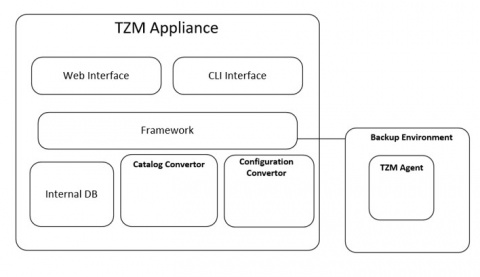
Tranzman Components
Appliance Component
- Queue Manager (tzmqm)
- Data Transfer Engine (tzmtd)
- Built on Rocky Linux sources and utilizes an internal PostgreSQL database.
- Accessible via CLISH (Command Line Interface Shell) and web user interface (webUI), hosted on an internal web server running nginx.
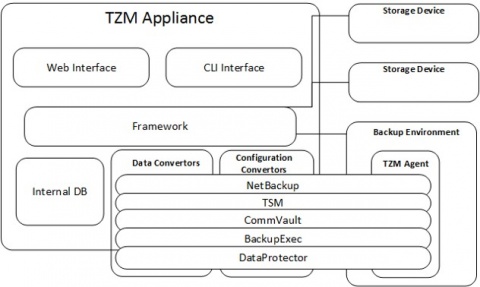
- Configuration Converters, Catalog Converters, and Data Converters manage all data manipulations internally.
Agent Component
- Acts as the communication bridge between Tranzman and the backup server.
- Waits for instructions from the Tranzman Server.
- Executes received actions and reports status back to the Tranzman Server.
- Minimal standalone binary installed on the backup server, initiating tzmclnt and other necessary processes.
High-Level Process Flow
- All Tranzman Appliance processes rely on the relational database and the QueueManager.
- The QueueManager updates action queues for Agents, handling all migration-related operations.
- The Agent interacts with the Data Transfer Engine, fetching instructions and performing PUT/GET operations for catalog data.
- Actions retrieved by the Agents trigger various migration procedures.
Same Vendor Transition (SVT)

Cross Vendor Transition (CVT)

Recovery Without Vendor (RWV)
Actions
Actions are sequences of instructions executed by the agent on the backup server to facilitate transitions.
| Action | Description |
|---|---|
| Init | Runs once on both origin and destination during initial system discovery. |
| QueryProduct | Identifies the backup product installed on both origin and destination. |
| QueryConfig | Detects configuration objects (e.g., storage, credentials, workloads) on both systems. |
| QueryMedia | Continuously collects media-related data on both systems. |
| QueryImages | Continuously discovers all backup images on origin and destination. |
| CreateConfig | Creates necessary configuration components on the target system. |
| CreateWorkloads | Establishes required backup configurations on the target system. |
| CrossCheck | Performs daily data comparisons between origin and destination. |
| ExportImages | Cyclically exports selected images from the origin system. |
| ManipulateImages | Renames or converts components mapped between origin and destination. |
| ImportImages | Imports migrated images cyclically into the destination system. |
| CreateMedia | Updates or creates new media on the destination system. |
| CheckConn | Tests client connectivity and pushes NetBackup certificates. |
| FinalizeOrigin | Completes final origin system preparations before switchover. |
| FinalizeDestination | Completes final destination system preparations post-switchover. |
| Assessment | Executes pre-assessment and post-transition validation tests. |
| HouseKeeping | Cyclically clears completed records from the Tranzman Database. |
| PreDuplication | Performs pre-duplication on the origin based on split migration rules. |
| PostDuplication | Performs post-duplication on the destination storage as part of migration. |
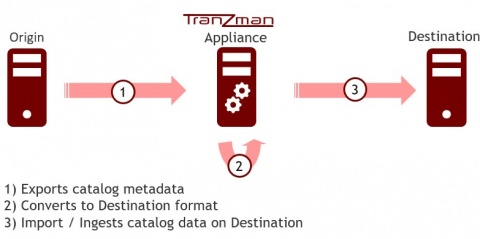
Migration Flow
Same Vendor Migration Flow

Cross Vendor Migration Flow
If the backup data is stored on Tape
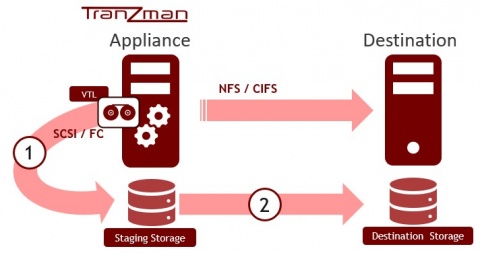

- (1) The Tranzman server reads data directly from tapes via its Data Converter.
- (2) Optionally, converted data may be duplicated onto a destination storage system.
If the backup data is stored on Disk
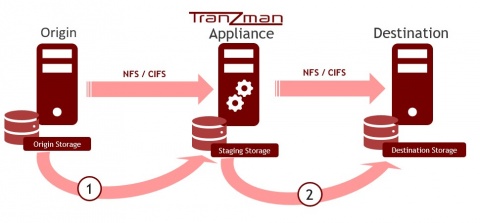

- (1) The converter reads data from the origin storage over NFS/CIFS.
- (2) Optionally, converted images may be duplicated onto the native destination storage.
If the backup data is encrypted or deduplicated
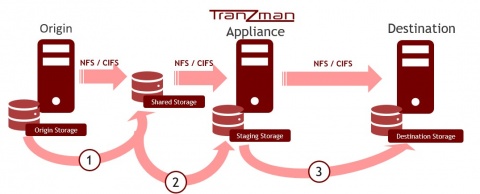

- (1) Pre-duplicate the data onto shared storage.
- (2) The converter reads the data from shared storage.
- (3) Optionally, data may be duplicated onto native destination storage.

